


MusiChic-Offline Music Player
4.1130.00 Reviews
App Specs
- Version
- 1.3.1
- Updated On
- License
- Free
- Downloads
- 10,000,000+
- Developer
- JIMMY SMALL.inc VIDEOSTORY
- Categories
- Music & Audio
- Platform
- Android
Screenshots

 Analysis by AppCompare
I reach for MusiChic-Offline Music Player when I want a straightforward way to listen to music without relying on a steady connection. Its appeal is practical: prepare music in advance, then have it ready for a commute, a trip, or a patchy-signal stretch. I like that focus, though it’s worth separating a useful listening companion from a tool for making or publishing creative work. This app is for enjoying tracks, not producing them.
Choosing a player for everyday listening
Music apps tend to fall into two camps: streaming services built around discovery and libraries, and local players built around audio already on your device. MusiChic sits closer to the second use case while also offering curated playlists and recommendations. That combination can suit someone who wants personal music close at hand but appreciates occasional suggestions. If your main goal is exploring a large streaming catalog, social listening, or managing a professional audio library, a more specialized service or player may fit better.
I’d consider it especially for listeners who travel, commute through areas with unreliable reception, or prefer not to spend mobile data on repeated listening. It is free, rated for Everyone, and developed by JIMMY SMALL.inc VIDEOSTORY. Its average rating is 4.1 from around 12,000 ratings, with roughly 130 written reviews and over 10 million installs. Those figures suggest broad use, but they can’t tell you whether its particular approach will suit your music habits.
A realistic day with offline music
Picture a busy weekday: I’m leaving home for a commute that includes a subway ride, then heading into a building where reception is unreliable. The sensible workflow is to get the music ready before leaving, make sure the tracks I want are available offline, and choose a playlist that suits the whole journey. That small bit of preparation matters more than any promise of uninterrupted listening; an offline player can only help if the music is ready before the connection disappears.
I’d also make separate playlists for situations rather than trying to build one enormous queue. A short commute mix, a calmer playlist for focused work, and a longer selection for travel are easier to manage when plans change. It is a simple habit, but it makes an offline library feel intentional instead of like a pile of tracks downloaded at random.
Where the app fits—and where it doesn’t
The app’s Music & Audio category is a broad one, so the useful comparison is with the tools people actually choose. A streaming-first service is generally the better fit if I want to search a huge catalog on demand and discover releases as they arrive. A basic device music player may be enough if I only need to play a few local files. MusiChic makes more sense when offline listening, playlist organization, and a modest layer of recommendations are all part of the same routine.
That middle ground has a trade-off. Recommendations are welcome when I’m in the mood to browse, but they aren’t a replacement for the depth or discovery controls of a service built around streaming. Likewise, a local player’s usefulness depends on having music available to play. I would not choose this as a substitute for a production workstation, podcast editor, or publishing platform; its job is playback, not turning a creative project into a finished release.
Worth Reading Before You Choose

EA SPORTS FC Mobile 26 Is a Bigger Football Game, but It Takes Time

Flipboard Shows What News Apps Must Do Beyond the Feed

Switching to Android Auto Means Rethinking Your Driving Routine

Google Calendar Makes a Crowded Week Easier to Manage

Ludo King Makes the Most of the Minutes Between Plans

Baby Panda World Brings Quick Play to Modern Phones, but Its Game Library Feels Busy
Preparing a library without creating clutter
One practical tip is to treat offline preparation as a small library-management task. Before a trip, I’d check the specific playlists I plan to use rather than assuming everything I might want is ready. I’d also keep the playlist names clear and purpose-based. That helps when I’m in a hurry and avoids scrolling through a long collection while walking or boarding.
Another useful trade-off is variety versus predictability. A playlist assembled for a known journey is dependable, while recommendations can add freshness when I have time to explore. I’d use the curated suggestions at home or on a reliable connection, then rely on a deliberately chosen set of tracks when being online is uncertain. This separates discovery from the moment when I need music to simply work.
What to check before relying on it
Offline use is most valuable when the listening setup has been tested before it matters. I’d try a few tracks in airplane mode or with connectivity turned off before a long journey, then confirm that the playlist behaves as expected. This is a general, sensible check for any offline player, not a claim that every track or format will behave identically in every situation.
It is also worth keeping expectations grounded around sound. A player can preserve the quality of the audio file it plays, but it cannot improve a low-quality recording or make every pair of headphones sound the same. If sound adjustment matters to you, the equalizer described in the app’s experience can help tailor playback, but I’d make small changes and compare them with the original rather than assuming stronger bass or treble always means better sound.
The app is free, and its current version is 1.3.1; it was released on May 9, 2025, and requires Android 7.0 or later. That gives Android users a clear compatibility point to check before installing. I’d still look at the app’s current store page on my own device for platform availability and compatibility details, since those can differ between Android and iOS.
One question people often have is whether an offline player is useful without a large collection. It can be, but the benefit grows with the amount of music you already have ready to listen to. If nearly all your listening comes from on-demand streaming, this may feel like an extra player rather than a replacement. If you already organize tracks and playlists, it has a clearer role.
Another consideration is how much control you want. The straightforward layout is appealing if you want to get to your music without learning a complicated system. On the other hand, listeners who need detailed library tagging, extensive queue controls, or specialist audio management should compare it with a player designed around those needs. Simple is a strength only when it matches the job.
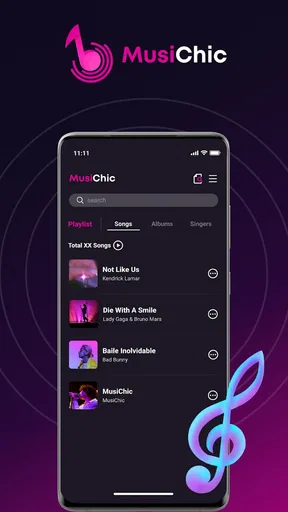
Back in my own use, the first thing I noticed after installing MusiChic-Offline Music Player was that it doesn’t try to overwhelm me with options. It opens up a world of possibilities, making it feel like I’m holding a secret treasure trove of music in my hands. The app’s clean, intuitive interface is a breath of fresh air, and I can easily navigate through my music library without getting lost in a sea of menus and settings.
Getting Started with MusiChic
First things first, downloading the app was a breeze. Available on both Android and iOS, it’s just a quick search away on your respective app store. Once installed, I was greeted with a sleek, intuitive interface that didn’t overwhelm me with too many options. It was like the app was saying, "Hey, let’s get straight to the music."
Interface and Usability
The design is minimalistic but functional, which I absolutely love. It’s got this cool dark mode that’s easy on the eyes, especially during those late-night jam sessions. Navigating through my playlists, albums, and artists felt seamless. There are no complicated menus to dig through, making it perfect for people like me who just want to hit play and vibe.
Offline Features
Now, let’s talk about the real MVP feature here: offline music playing. I went on a road trip last weekend, and let me tell you, the app was my best friend. I simply downloaded all my favorite tracks beforehand, and boom, endless music without a single pause or drop in quality. It’s like having a personal concert, minus the crowd and overpriced drinks.
One neat thing is the app’s ability to maintain audio quality even when offline. I’m a bit of an audiophile, so this was a big win for me. The sound is crisp, clear, and full-bodied, giving me the concert-quality experience I crave.
Customization Galore
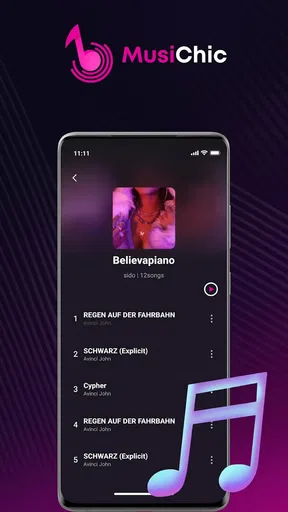
For those who like to tinker with their music settings, the app has got you covered. There’s a nifty equalizer feature that lets you tweak the sound to your liking. Whether you’re a bass head or prefer those high treble notes, you can adjust it all. Plus, organizing playlists is a cinch. I found myself creating a "Feel Good Friday" playlist in minutes, and it was ready to rock my weekend.
Additional Features
Another cool aspect is the app’s compatibility with various audio formats. I’ve got some old tracks in FLAC format, and the app played them without a hitch. It’s like the app is saying, "Throw anything at me, I got this!"
Also, for those who love discovering new music, there are curated playlists and recommendations based on your listening habits. It’s a nice touch that keeps the music fresh and exciting.
User Experience
In terms of user experience, the app is pretty spot on. It doesn’t bombard you with ads, which is a huge plus in my book. The app runs smoothly, and I didn’t encounter any crashes during my use. Plus, the battery consumption is minimal, so you can enjoy your tunes without worrying about draining your phone.
Final Thoughts
All in all, the app is a solid choice for anyone looking to enjoy music without the fuss of constant connectivity. It’s straightforward, reliable, and offers just the right amount of features to keep any music lover happy. Whether you’re on a plane, in the middle of nowhere, or simply want to save on data, the app has you covered.
If you’re tired of your current music app or just want something that works offline flawlessly, give it a whirl. Trust me, your ears will thank you!
Pros
- User-friendly interface for easy navigation.
- Supports various audio formats seamlessly.
- Offline playback saves data usage.
- Customizable playlists enhance user experience.
- Equalizer settings for personalized sound.
Cons
- Limited cloud storage integration options.
- Ads in the free version can be intrusive.
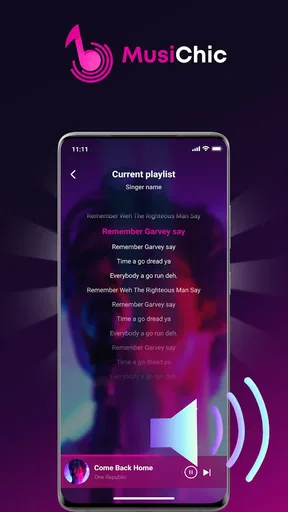
- No built-in lyrics display feature.
- Lacks social media sharing capabilities.
- Premium version is relatively pricey.
FAQs for MusiChic-Offline Music Player
How does MusiChic-Offline Music Player work without an internet connection?
MusiChic-Offline Music Player allows users to download and store their music directly onto their device. This means you can listen to your favorite tracks anytime, anywhere, without needing an internet connection. Simply download your music while connected to Wi-Fi or data, and enjoy seamless playback offline.
What audio formats does MusiChic-Offline Music Player support?
MusiChic-Offline Music Player supports a wide range of audio formats to ensure compatibility with most music files. This includes popular formats like MP3, AAC, FLAC, WAV, and more. The app is designed to deliver high-quality sound regardless of the format, so you can enjoy your music in its best form.
Does MusiChic-Offline Music Player offer customizable playlists?
Yes, MusiChic-Offline Music Player allows users to create and customize playlists easily. You can organize your music by genre, mood, or any other preference. The intuitive interface makes it simple to add, remove, or rearrange songs to curate the perfect listening experience tailored to your tastes.
Are there any in-app purchases or advertisements in MusiChic-Offline Music Player?
MusiChic-Offline Music Player offers a free version with limited features and occasional ads. For an ad-free experience and access to premium features such as enhanced audio settings and additional customization options, there is a one-time purchase option. This allows users to choose the experience that best suits their needs.
Can I transfer my music library from another app to MusiChic-Offline Music Player?
Yes, you can easily transfer your music library to MusiChic-Offline Music Player. The app supports importing music from various sources, including your device storage and other music apps. A step-by-step guide is provided within the app to facilitate a smooth transition, ensuring all your favorite tracks are ready to play.


